GGPoker Code October 2026
- How to use GGPoker Bonus Code
- GGPoker Code and Website Information
- GGPoker Welcome Bonus
- How to Download GGPoker
- GGPoker Bonus Code FAQ
The GGPoker Bonus Code is "gopoker"
How to use GGPoker Bonus Code
Sign Up
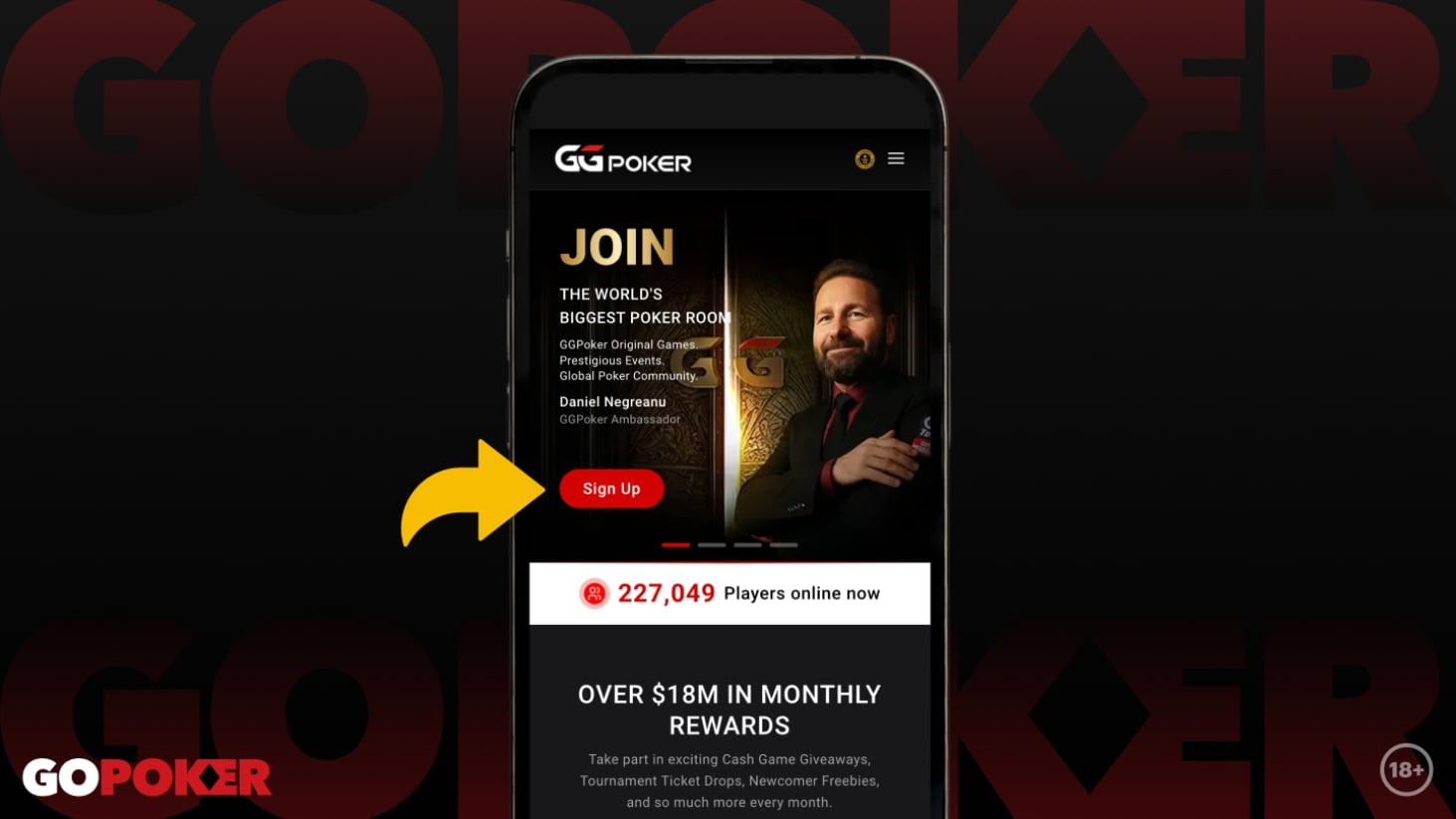
Ready to play? Look for the prominent red button on GGPoker’s home screen. Whether it’s labeled ‘SIGN UP’ or ‘GET STARTED’, a single click on that button is all it takes to launch the account creation window.
Create GGPass
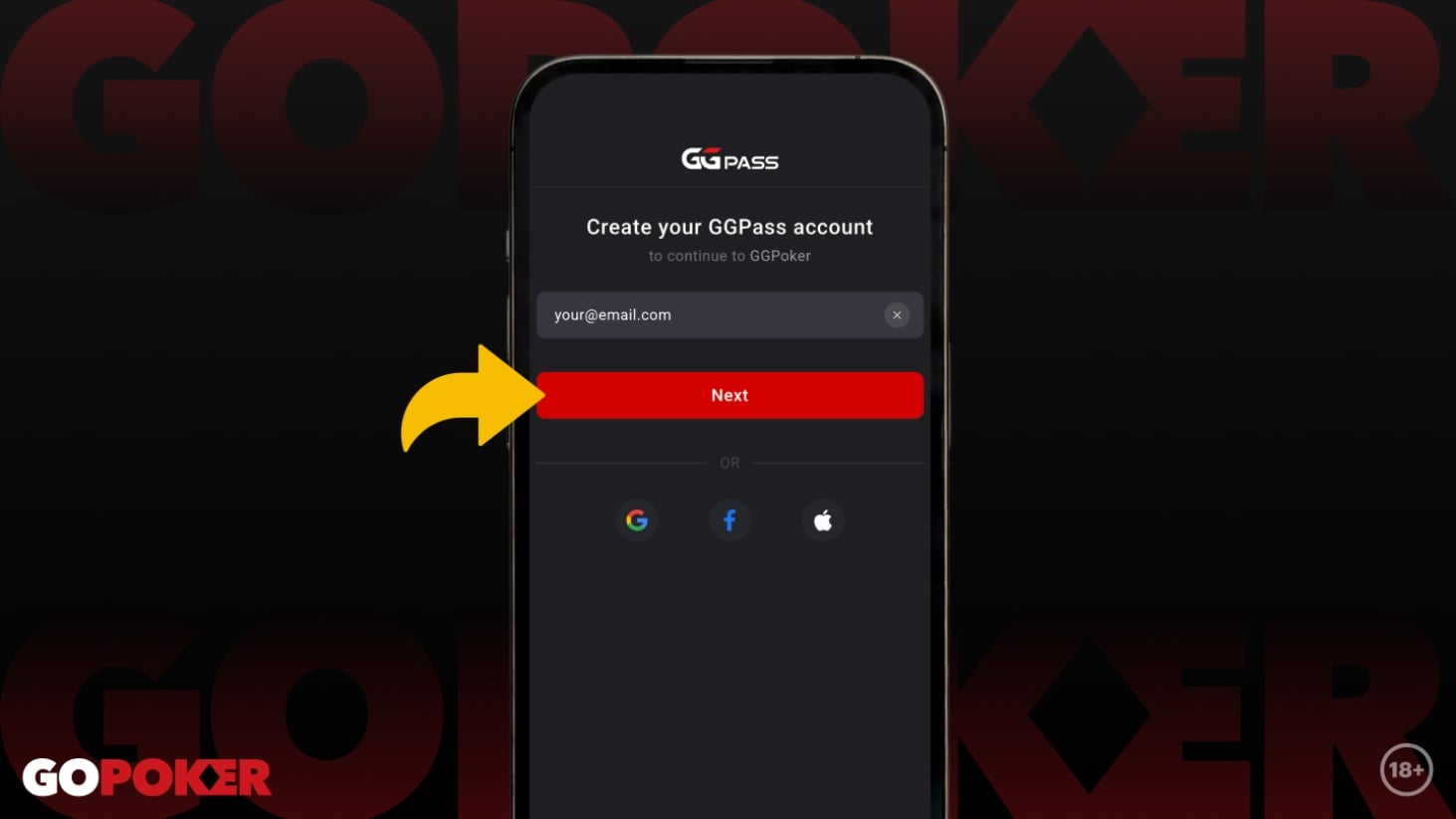
To start, enter your primary email address into the GGPass signup field. It can be any active account you own, as long as it’s yours. After entering the details, click the ‘NEXT’ button to move to the final setup steps.
Setup your password
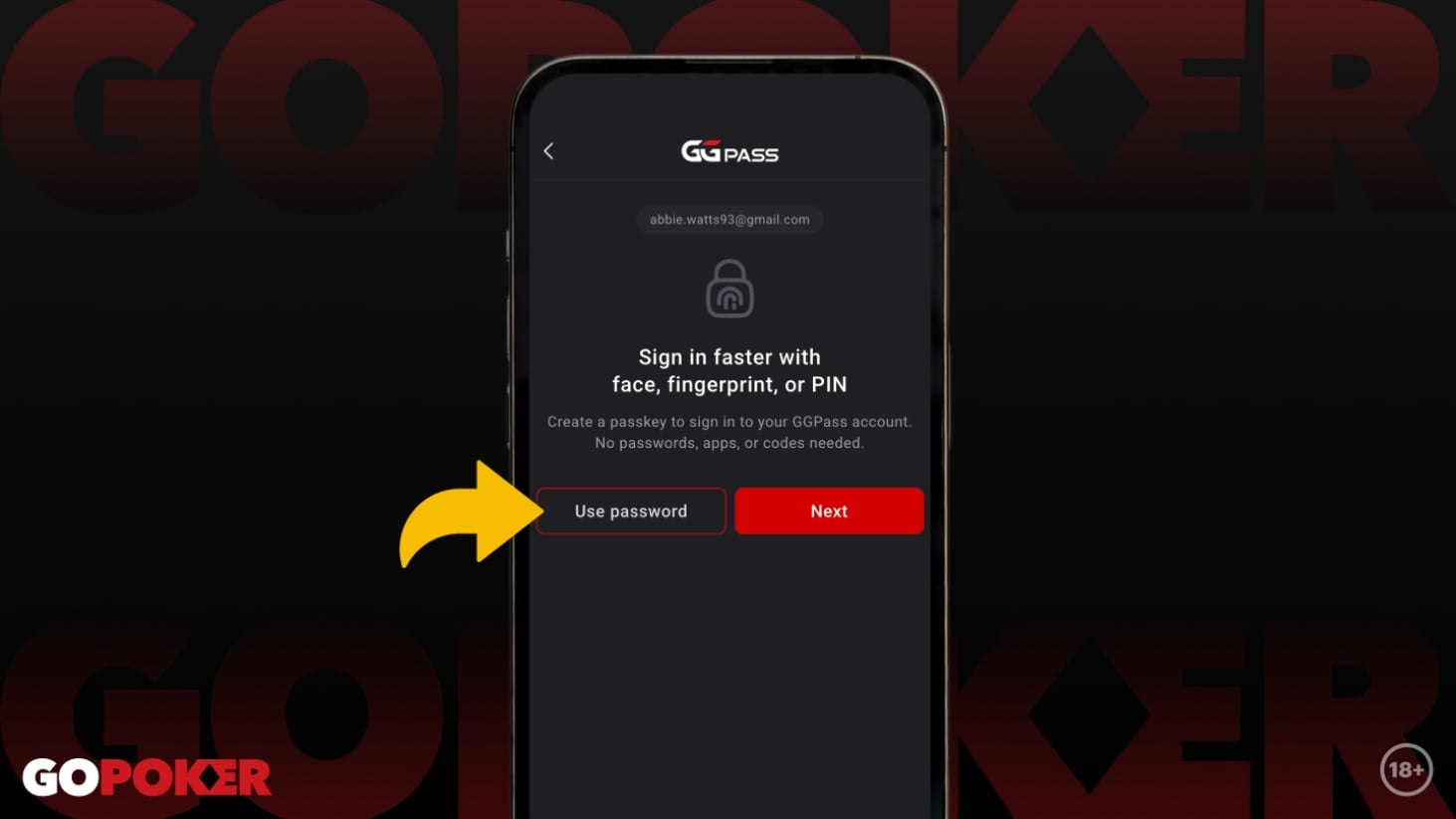
Next, choose between a custom password or a secure passkey. You don't need both. If you prefer a standard password, click ‘USE PASSWORD’ to enter your details. If you’d rather use a biometric or device-linked passkey, simply click ‘NEXT’.
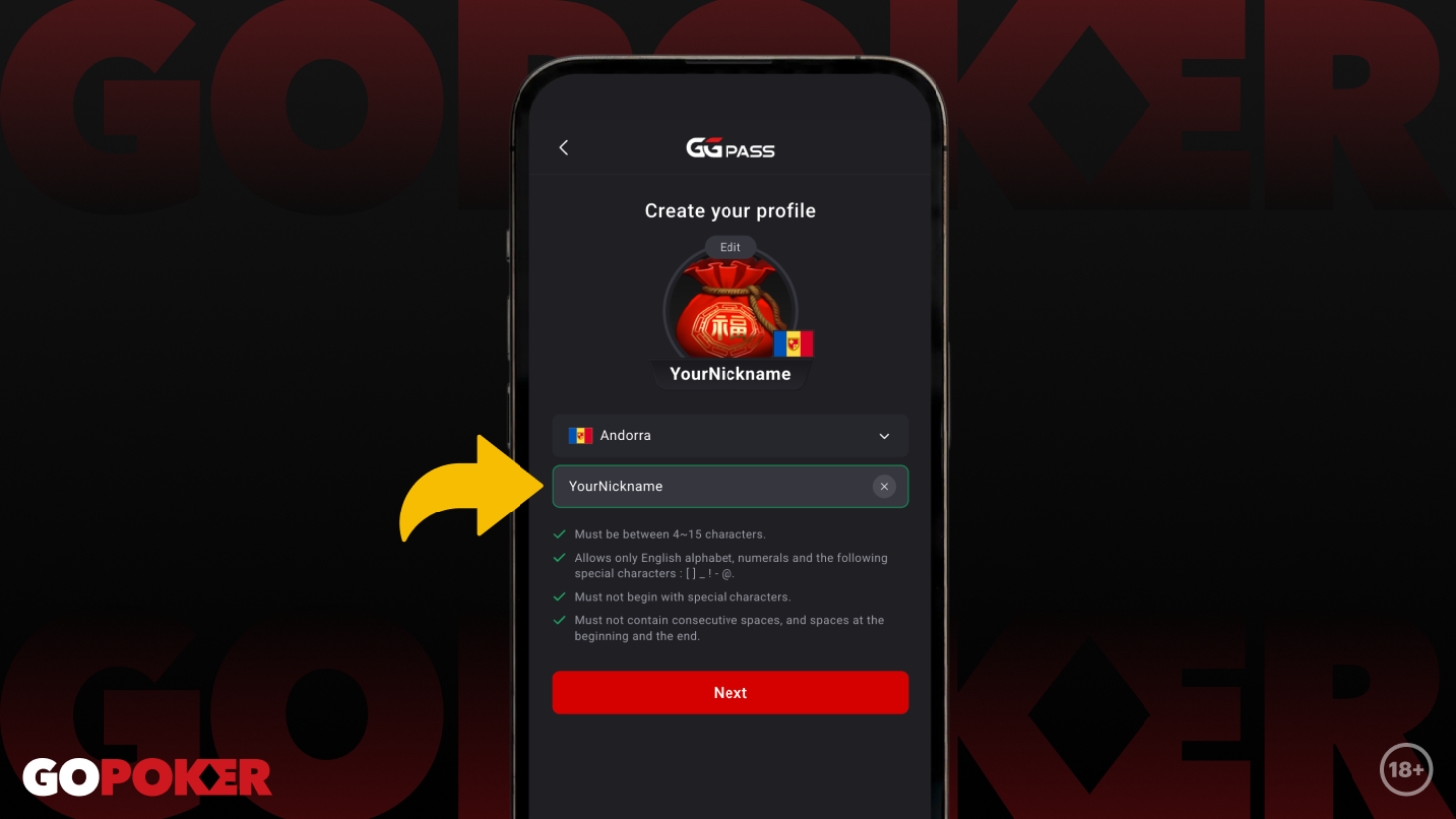
Choose your nickname
Your NICKNAME is how your opponents will identify you during the game. Choose carefully, because your first choice is final and cannot be edited later. Remember that GGPoker enforces a strict 'common sense' policy regarding nicknames to keep the environment friendly. While you can also set your country and avatar on this screen, don't worry, you can always update those details after you've finished signing up.
Enter bonus code
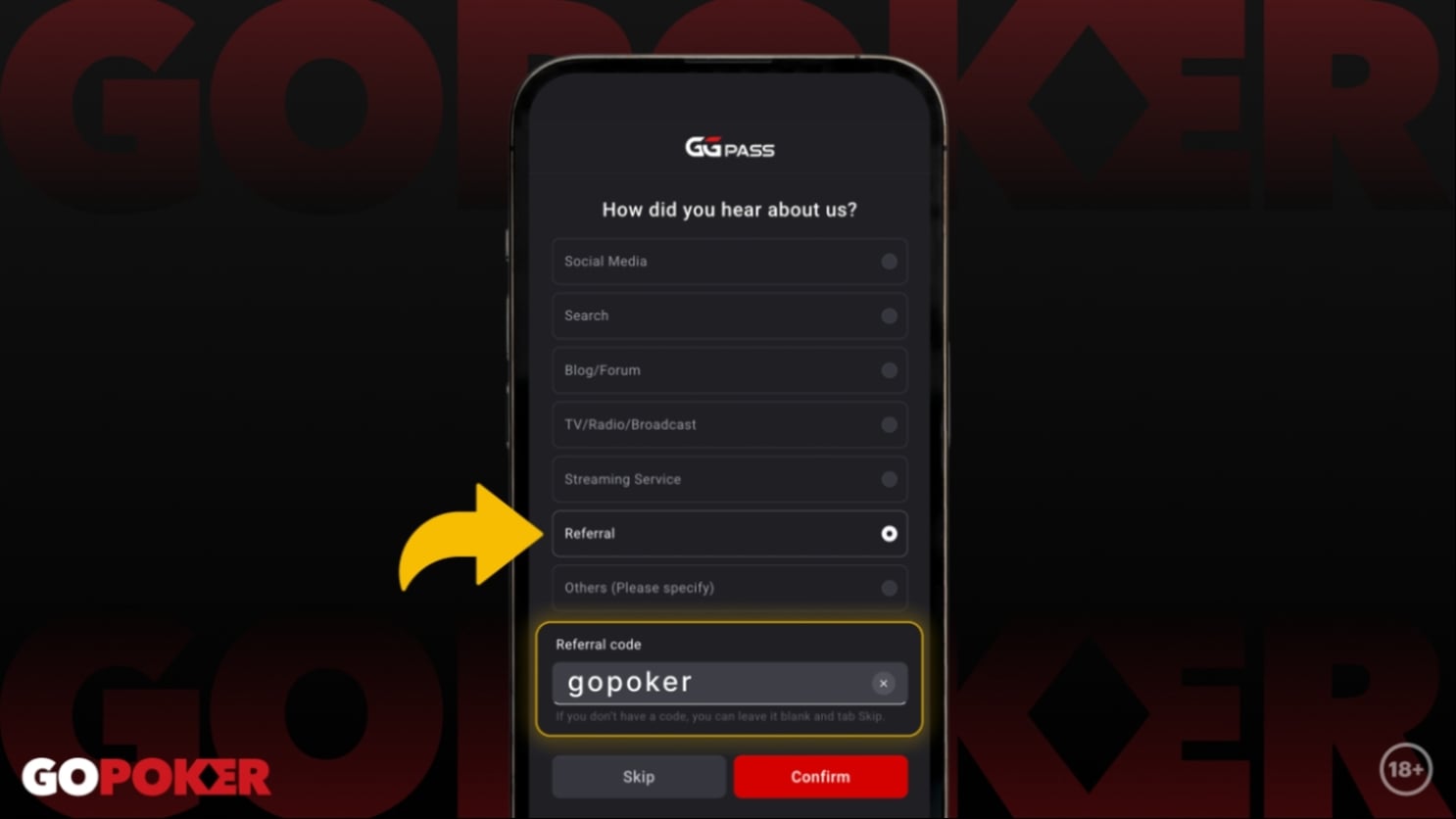
Keep an eye out for the next screen, which contains a short questionnaire. You’ll want to focus specifically on the Referral Code button. Once clicked, a box will open up for you to type in your BONUS CODE. It is essential that you enter the code here, if you skip past it, you won't be able to claim the premium bonuses reserved for our community.
Make a deposit and claim your bonus
Finalize your setup, make that first deposit, and lock in your Welcome Bonus! Once you're at the tables playing some world-class poker, keep an eye on your account for the extra rewards triggered by your Bonus Code.
GGPoker Code and Website Information
| GGPoker Bonus Code | gopoker |
| Deposit Bonus | 100% |
| Poker Bonus | $600 (plus an additional $350 in rewards in first 30 days) |
| Minimum Deposit | $10 |
| Accepts Crypto? | Yes, including Bitcoin (BTC) and Tether (USDT) |
| Currencies | US Dollars, Canadian Dollars, Brazilian Real, GB Pounds and others |
| WSOP Entry? | Yes |
| Rewards Program? | Yes, including Fish Buffet with 60% cashback |
| GGPoker App | Yes – Download for free on PC, Mac, Android and iOS |
GGPoker Welcome Bonus
- Log in to your new GG Poker account (if you are yet to register, see the above step-by-step guide)
- When asked if you have a GGPoker Bonus Code, type in the "gopoker" code
- Make your first deposit using one of the many available payment methods
How to Download GGPoker
- When you visit the official GGPoker website, click the ‘Download Now’ button to download the GGPoker app to your computer or mobile device.
- When the app has downloaded, open the file, which may be saved to your Download folder), then select your preferred language in the ‘Setup’ window.
- Click ‘Install’ to continue.
GGPoker App Requirements
- Minimum Windows 8 (Windows 10 recommended)
- Minimum 3 GHz processor (Intel Core i3 or higher recommended)
- Minimum 2 GB RAM (4 GB or greater recommended)
- Minimum 1 GB of free disk space (10 GB or greater recommended)
- OS X 10.10 or higher
- Minimum 3 GHz processor (Intel Core i3 or higher recommended)
- Minimum 2 GB RAM (4 GB or greater recommended)
- Minimum 1 GB of free disk space (10 GB or greater recommended)
- Minimum Android OS 6.0.xx Marshmallow (10.0 or higher recommended)
- Minimum 2 GB RAM (3 GB or greater recommended)
- Minimum 250 MB of free disk space (1 GB or greater recommended)
- Minimum iPhone 7 Plus / iPad Air 2 / iPad Mini 4 (iPhone X or higher, iPad 7 / iPad Air 3 / iPad Pro 2 /iPad Mini 5 or higher recommended)
- Minimum 3 GB RAM
- Minimum 250 MB of free disk space (1 GB or greater recommended)
GGPoker Payment Methods
- Visa
- Mastercard
- Bitcoin
- Bank Transfer
- Neteller
- Tether
- Skrill
- Apple Pay
- Webmoney
- MuchBetter
- ecoPayz
- AstroPay
- LuxonPay
- Interac
GGPoker Games and Tournaments
- WSOP
- GGMasters
- MILLIONS
- Daily Guarantees
- High Rollers
- Bounty Hunters
- Chinese Zodiac
- Omaholic
Promotions on GGPoker
WSOP Online 2026
GGPoker September Giveaway 2026: $18M in Rewards

GGPoker Information
GGPoker Bonus Code FAQ
- What is the GGPoker bonus code?
The GGPoker bonus code is "gopoker". Use this code when registering a new account when asked on the registration form if you have a bonus code and you will unlock the biggest available welcome bonus.
- Where do I enter the promo code?
GGPoker has recently updated its sign-up flow. The code is now entered in the "Referral Code" box. After entering your email and password, a questionnaire will ask "How did you hear about us?" Select the Referral option to reveal the box where you can type your code.
- How is the 100% Deposit Match bonus released?
The bonus is not credited as instant cash. Instead, it is released in $1 increments for every $5 you generate in net rake or tournament fees. This is ideal for high-volume players who plan to play regularly.
- What is the "Honeymoon for Newcomers" promotion?
This is a 30-day challenge available to all new accounts. By completing daily poker missions, players can earn up to $350 in additional rewards, such as tournament tickets and cash prizes, completely separate from the initial welcome bonus.
- Can I withdraw my bonus money immediately?
No. Bonus funds must be "cleared" by playing at the tables. Once the bonus is converted into your cash balance (at the $1 per $5 rake rate), those funds are yours to keep or withdraw as per the standard withdrawal terms.
- Is there a minimum deposit to claim the bonus?
Yes. To claim the $100 in Rewards package, a minimum deposit of $20 is required. For the 100% Matched Bonus, the minimum deposit is typically $10, though $20 is recommended to ensure full eligibility for all site features.